Farm management software
Farm records your AI team keeps up to date.
Stock, crops, paddock maps, inventory, machinery, sensors and the farm office in one place. Tap a record in yourself, or tell the team and it’s done for you.
- Records come with every plan
- 21 species by name
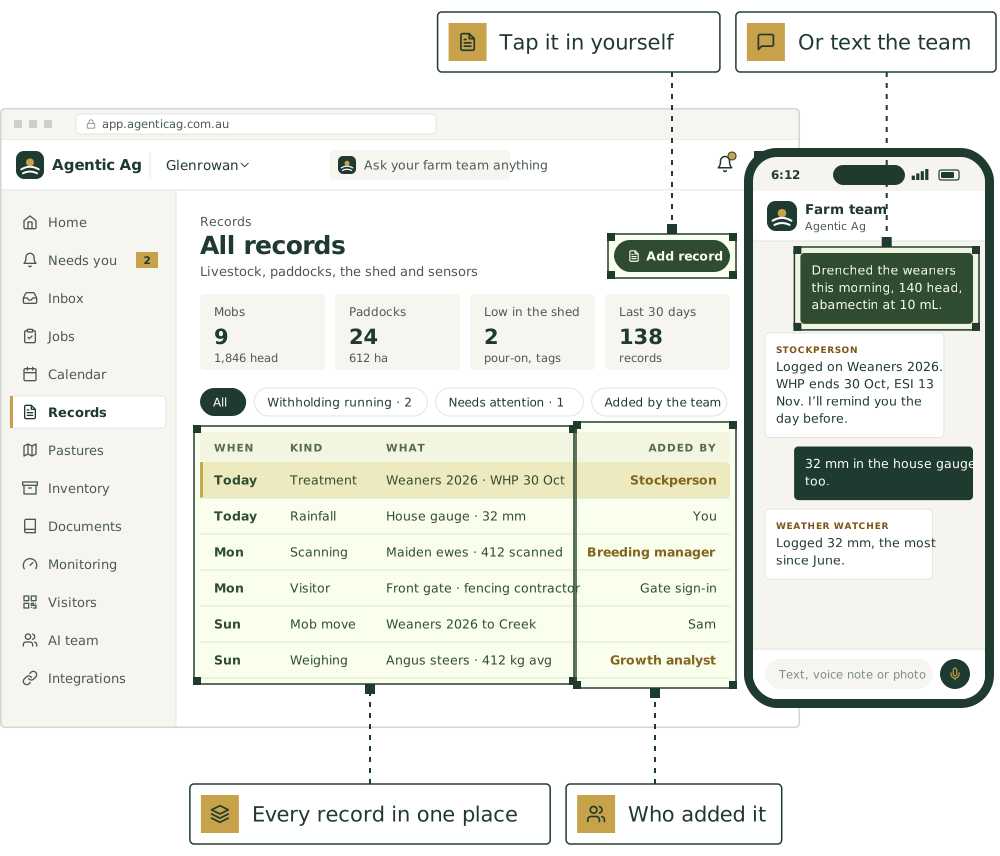
The records, and the office around them.
Each part works on its own forms, and the AI team works from all of them.
The records
Stock, paddocks, crops, birds, ponds, machinery, sensors, the gate and the people on the farm.
The farm office
The jobs, the paperwork, the mail and the reports around them.
Working with your AI team
What starts the agents, what comes back to you, and how they work together.
Every kind of record
Each kind asks only what fits it.
A treatment asks for the dose and WHP, rain asks for mm. Add up to 30 fields of your own to any kind.
Livestock
- MobsWhat they are, how many head and where they are.
- AnimalsKept one by one: tags, parents, weights, scans and photos.
- TreatmentsDrenches, vaccines and other treatments, with WHP and ESI dates.
- JoiningRams or bulls put in with a mob, or one female joined.
- ScanningPregnancy scanning results.
- WeighingWeights and condition scores, for one animal or a mob.
- Health checksAnything found wrong: lame, pinkeye, mastitis.
- Births and deathsYoung born and stock lost, changing the mob’s head.
- Sales and purchasesWith the price, the buyer or vendor and the declaration.
- Kills and kill sheetsStock sent for slaughter, with each carcase matched to its animal.
- Mob movesA mob moved to another paddock.
- FeedingFeed given to a mob or in a paddock.
Paddocks and crops
- PaddocksWith the other names people use for them.
- The paddock mapPaddocks drawn or imported, with every mob on it.
- Chemicals and fertiliserPut on a paddock, with grazing withholding.
- RainfallRain measured, by paddock or gauge.
- Soil testsA lab’s figures, by paddock, plot or bed.
- Crops and blocksCrops by season, plantings, harvest loads and contracts.
- Market gardenBeds, sowings, crop checks, orders and pick lists.
Birds and water
- Flocks and batchesDaily sheets, lay rates, losses and sheds.
- Ponds and batchesStock counts, water readings and harvests.
Water and sensors
- Sensor readingsTrough, tank, dam and soil moisture readings.
Machinery
- Machinery servicesServices and repairs, with hours or km.
People and safety
- VisitorsWho came onto the farm and where they went, for biosecurity.
- WHS incidentsWorkplace health and safety incidents and near misses.
- InductionsWorkers and contractors inducted, and what was covered.
- Field reportsFerals, sick stock, pests and safety issues, from the paddock.
Inventory
- Stock on handVaccines, chemicals, seed, feed and fuel, by batch with expiry.
- StocktakeOne sheet to count a kind of stock or a whole shed.
Flags and notes
- Needs attentionAn animal, a mob or a record flagged for a person to look at.
- NotesAnything else worth keeping.
Two ways in
Tap it in, or say it.
On the form
- Starts with what happened and when, then only the fields that fit.
- Opens on the kinds your farm records most.
- Same again on any record, dated today.
- One search across names, notes, products, labels and your own fields.
By text, voice note or photo
- Tell the team what happened, the way you’d say it.
- A specialist records it and tells you what it saved.
- Set any agent to ask first before it changes a record.
Treatments and withholding, in the chat
IllustrativeDrenched the weaners this morning, 140 head, abamectin at 10 mL.
 Stockperson
Logged on Weaners 2026. I’ve 142 on record, so were 2 left out? WHP ends 30 Oct; I’ll remind you the day before.
- Mob
- Weaners 2026
- Head
- 140
- Product
- Abamectin drench
- Dose
- 10 mL
- WHP until
- 30 Oct
- ESI until
- 13 Nov
Already on farm software? Keep it.
The team reads from each one as its connection is built. Until then it works from what you text, forward or upload. No farm software yet? The records come with every plan, so start here.
AgriWebb
Once it’s connected, the team reads your mobs, animals and paddocks from AgriWebb, so you don’t key anything in twice.
Mobble
The team would read your mobs, paddocks and treatments from Mobble, so nothing is keyed in twice.
MaiaGrazing
Grazing plans and stock and pasture records from MaiaGrazing would sit alongside everything else.
FarmMap4D
Your property map, paddocks and infrastructure would come in, with pasture and ground cover over time.
John Deere Operations Center
If we get access, machine records for sowing, spraying and harvest would be filed against the right paddock.
Back Paddock
Agronomy recommendations and spray records from Back Paddock would come in alongside your records.
PCT AgCloud
Precision farming maps and machine data from PCT AgCloud would come in alongside your records.
Questions
Still have a question?
Ask a real person, or see the product in a 30-minute demo.
Do I have to move my records across to use the AI team?
Can I use the records without the AI team?
How do I get my old records in?
What does it cost?
Does it work outside Australia?
Put [AGENT NAME] to work on your farm.
We’re taking a small number of pilot farms in [REGION]. Start with one or two agents and add more as you go.
See it on a farm like yours.
30 minutes with Thomas, our founder, on records like your own.
Livestock, paddocks, visitors and tanks, in one place.
The farm management software comes with every plan. Keep the software you already use, or use ours.
Not ready yet? Start with a free calculator.
The sums you do every week, for stock, pasture, crops and the books. No sign-up.
Watch a job before you commit.
Pick a playbook and see it play out, step by step.