It only does what you’ve said it can.
You set how much each agent does on its own. Anything past that comes to you first, and nothing it reads can change that.
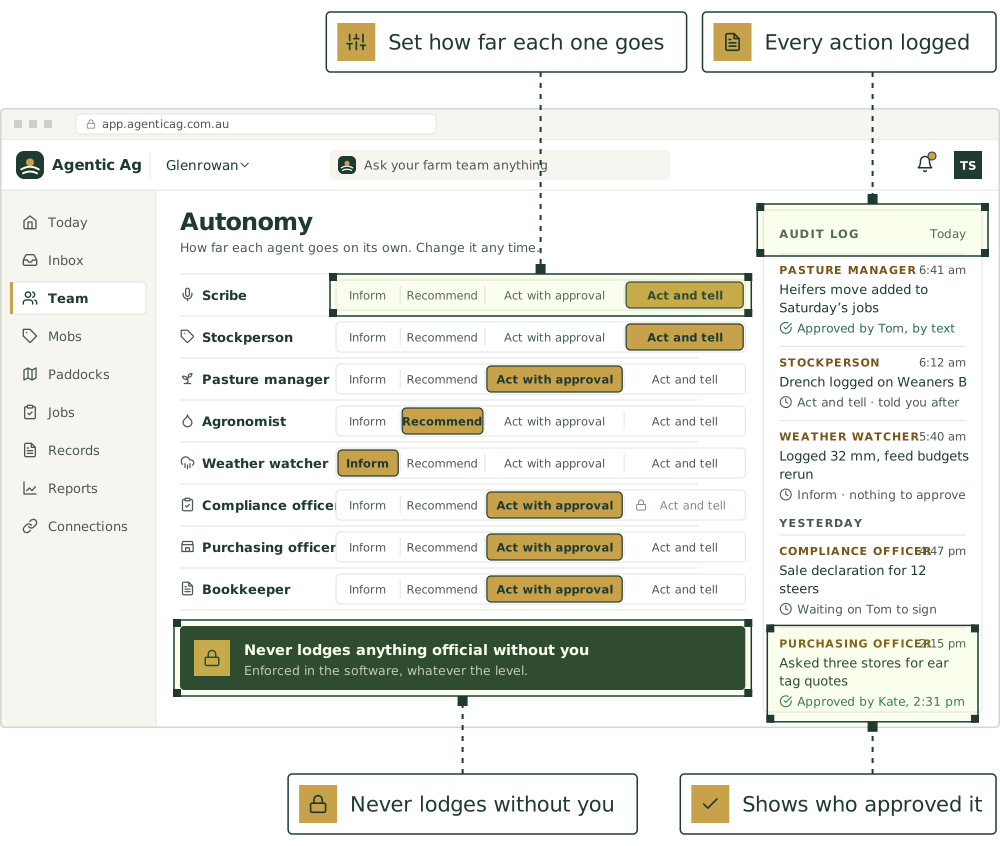
Checked every time
What each agent can do without asking.
Every action has a risk level. You set each agent’s approval level, and the software checks every action against it.
| Approval level | Read and tell you | Draft | Change records | Contact people | Lodge |
|---|---|---|---|---|---|
| InformTells you what’s happening. Does nothing. | Goes ahead | Suggests it | Suggests it | Suggests it | Asks you |
| RecommendSuggests an action. You do it. | Goes ahead | Goes ahead | Suggests it | Suggests it | Asks you |
| Act with approvalPrepares it fully. You tap yes. | Goes ahead | Goes ahead | Asks you | Asks you | Asks you |
| Act and tellDoes it and logs it. You hear about it after. | Goes ahead | Goes ahead | Goes ahead | Goes ahead | Asks you |
Calls and texts always ask, whatever the level. Set the level per agent, and per kind of job: see approval levels.
Whatever you set
Rules that always apply.
Nothing is lodged without your approval.
The software checks every action.
Each agent can only do its own job.
Contacting anyone outside the farm asks you first.
You can set any action to “Always ask”.
You can pause any agent, or all of them.
Read all 9 rules in full
- Nothing is lodged with a government or industry system without your approval, whatever the approval level.
- The software checks these rules on every action an agent takes. They aren’t just written into its instructions, so a message or a note can’t talk an agent around them.
- Each agent can only do what’s switched on for it. The Agronomist can’t touch your accounts.
- Ringing, texting or emailing anyone outside the farm asks you first, every time, whatever the approval level.
- You can set any action to “Always ask”, and it asks you every time.
- Once an agent has read an email, document, PDF, photo or web page, anything that would change records or contact people asks you first until that job is done. Instructions hidden in a file or a website can’t make anything happen.
- Agents that search the web only search trusted sites chosen for their job, such as state agriculture departments, GRDC, APVMA, MLA, the ATO and Fair Work, a few searches at a time. Agents that don’t need the web can’t search at all.
- Settings and notes can only tighten the rules. Nothing an agent is told can loosen them.
- You can turn any agent down to Inform, pause it, or pause them all, at any time.
Calls and texts to your contacts Coming
- It asks you first, every time, and shows who it will contact and what it will say.
- It only contacts people on your contacts list.
- It keeps to your calling hours, on your farm’s clock.
- It says it’s an AI and that the call is recorded.
- Anyone who replies STOP isn’t texted or rung again.
A monthly AI budget
- Each farm has a monthly AI budget, enforced in code rather than by the AI.
- As you near it, our team is told.
- Go over it and background work pauses, but chats, texts and emails still get answered.
- Well past it, every agent pauses, so a runaway job can’t run up a bill.
AI checks
A second look at what it said.
After a reply goes out, automatic checks review it for the mistakes that matter on a farm. They add to the safety rules above, catching what those can’t, and anything they find is flagged for our team to review. We choose which checks run and how many replies each one reads, and your farm can see the list.
- Made-up facts
- A head count, date, tag, PIC or rainfall figure that isn’t in your records, the chat or something it looked up. Or saying it logged, sent or booked something when nothing did.
- Unsafe advice
- Chemical rates, withholding periods or export slaughter intervals that don’t come from the label or your records, doses that should come from a vet, or skipping a record an audit needs.
- Planted instructions
- Text in a forwarded email, PDF, photo or web page that tries to give the agent orders, whether or not it worked.
- Private information
- A worker’s phone number, pay, health or private messages shown to someone who shouldn’t see them. Stock, paddock and job details are shared on purpose and don’t count.
- Not checking first
- Answering from memory when it should have looked up your records, documents or forecast.
- Tone
- Anything rude, mocking or talking down. Short and blunt is fine.
- “That’s wrong”
- If your next message says the last reply was wrong or made up, it’s flagged for us to look at.
You can raise a flag too.
Anyone on the farm can flag a reply or a job, and a person on our team looks at it.
- Wrong or made up
- Unsafe or bad advice
- Did something it shouldn’t
- Rude or inappropriate
- Something else
See what it did, and what it held back.
- Every job and action is recorded, with what the safety check decided and who approved it.
- What was refused is logged too, so you can see where an agent wanted to go further.
- Every web search is logged with what the agent searched for.
- Every suggestion shows the records, rules and weather data behind it.
- Owners and managers can read the activity log at any time, with a monthly count of how often agents asked first or were stopped.
Your data
Where it lives, who sees it, how you leave.
[Australian-hosted]
Your records are stored in Australia. [Confirm provider and region]
Your data stays yours
[Export or delete it any time.] Never sold.
Roles for everyone on the farm
Owner, manager, staff and advisor, each seeing only what they need.
No training on your data
[Your records aren’t used to train AI models unless you opt in.]
Owner
Everything, including billing, roles and approval levels.
Manager
Runs the farm day to day: approves, assigns, changes plans.
Staff
Texts in work and sees their own jobs. Can’t approve lodgements.
Advisor
Sees only what you share, until you stop sharing it.
No signal in the back paddock? [Voice notes and photos are kept on your phone and sent when you’re back in range. Approvals wait for you, and nothing urgent is ever decided for you because you were out of reach.]
Questions
Still have a question?
Ask a real person, or see the product in a 30-minute demo.
Can it lodge something without me?
Can it ring or text people for me?
Can it search the internet?
What if it gets it wrong?
Who sees my data?
Where is my data stored?
Is my data used to train AI?
What works with no phone signal?
Set the limits first. Then hand over the work.
Join the pilot and choose what each agent can do on its own. Start with one or two agents in [REGION].