Needs you
One place for everything waiting on your yes.
Approvals, stuck jobs, stopped jobs and sign-offs, in one list. Say yes, say not now, or change the details first. Nothing is ever approved by itself.
- Never approved by itself
- Owners and managers decide
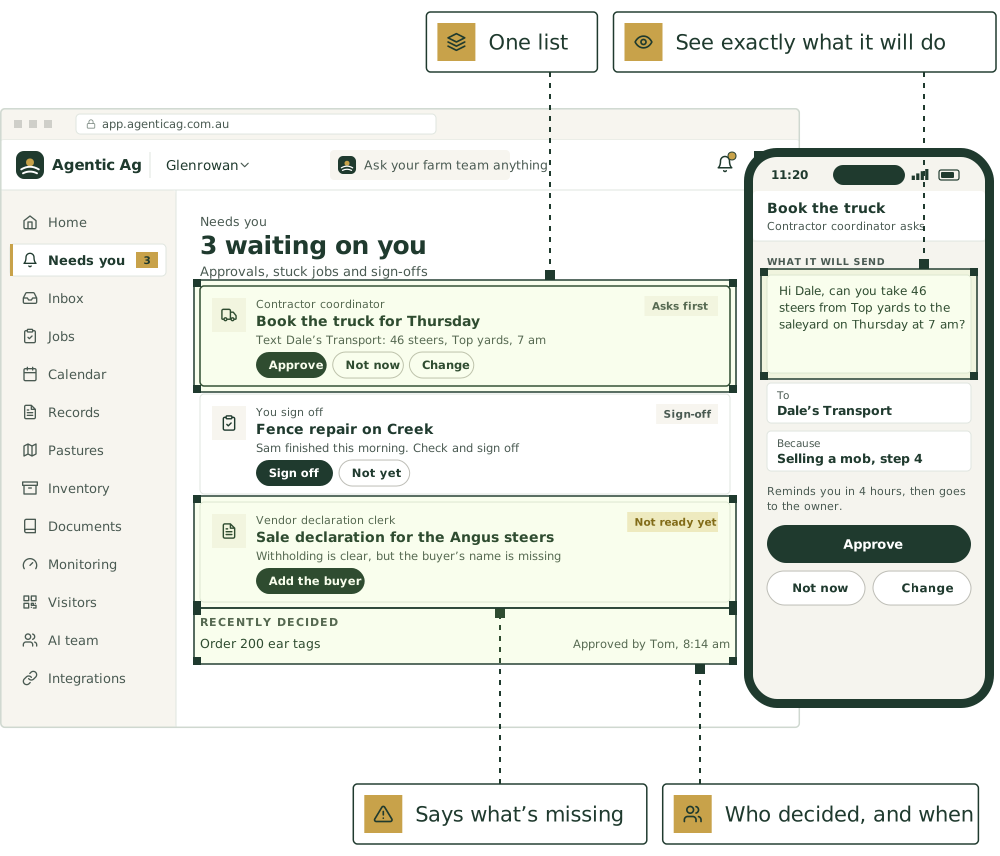
How an approval works
The agent asks. You decide.
- Step 1
The agent gets it ready
A card shows what it wants to do, on Needs you, on Home and in the chat.
- Step 2
The right person hears
It’s emailed to whoever the agent asks. Office addresses can get a copy of every new card.
- Step 3
You decide
Approve, Not now, or Change to edit the details first.
- Step 4
It follows through
An approved card links to what it made: the job, the record, the contact or the document.
If nobody answers
- A reminder after 2, 4, 12 or 24 hours
- Then it goes to the owner, or it’s cancelled, as you choose
- A cancelled card does nothing
- It’s never approved by itself
Who decides
- Owners, managers and staff can see the cards
- Owners and managers decide
- Staff see what waits on them, and that an owner or manager decides
- Recently decided shows who decided and when
A yes that stays safe.
It says when it can’t go ahead
A card that can’t be approved yet shows Not ready yet with a button to fix it, or Out of date.
No approving old versions
A card tied to a document goes out of date if the document changes.
Checked again on your yes
Approving re-checks the rules, so a yes can’t go ahead for an agent that has since been paused.
Done once
If two people approve at the same moment, the work is still only done once.
Stuck jobs too
Agents say when they’re stuck and what they need. Your reply sets them going again.
Always in view
A count under the greeting on Home, naming the first one, and a badge in the menu.
Agents that bring you decisions.
Every agent works to the approval level you set. These are some you’ll hear from.

[AGENT NAME]
The one you talk to: routes work, asks clarifying questions, sends the daily and weekly brief

Operations lead
Jobs, rosters, the Monday plan

Contractor coordinator
Shearers, sprayers, carriers, vets: bookings and confirmations

Purchasing officer
Compares quotes, reorders inputs, places orders with approval

Compliance officer
NLIS, eNVD, LPA audit readiness
Good first jobs
Jobs the team does with it.
Book the truck for a sale
When: A sale date is set
You get: Booking request emailed to your carrier after your yes; loading time on the plan
Book and chase contractors
When: “Get the spreader in before the rain”
You get: Booking emailed after your yes; on the plan once they confirm; a nudge if nothing comes back
Get three prices before you order
When: Drench is running low and shearing is booked
You get: Quotes side by side; the order emailed once you approve
Raise the agistment invoice
When: End of each month with someone’s stock on agistment
You get: A draft invoice for [owner], with the head count by week

Draft a sheep or cattle health declaration
When: A sale or transfer is booked
You get: Declaration drafted for you to check and sign
Draft the online shop update when stock runs low
When: Stock on hand drops below what’s listed in the online shop
You get: A draft change to the listing for you to make in the shop

Put [AGENT NAME] to work on your farm.
We’re taking a small number of pilot farms in [REGION]. Start with one or two agents and add more as you go.
See it on a farm like yours.
30 minutes with Thomas, our founder, on records like your own.
Livestock, paddocks, visitors and tanks, in one place.
The farm management software comes with every plan. Keep the software you already use, or use ours.
Not ready yet? Start with a free calculator.
The sums you do every week, for stock, pasture, crops and the books. No sign-up.
Watch a job before you commit.
Pick a playbook and see it play out, step by step.