Jobs and calendar
One job list for the people and the team.
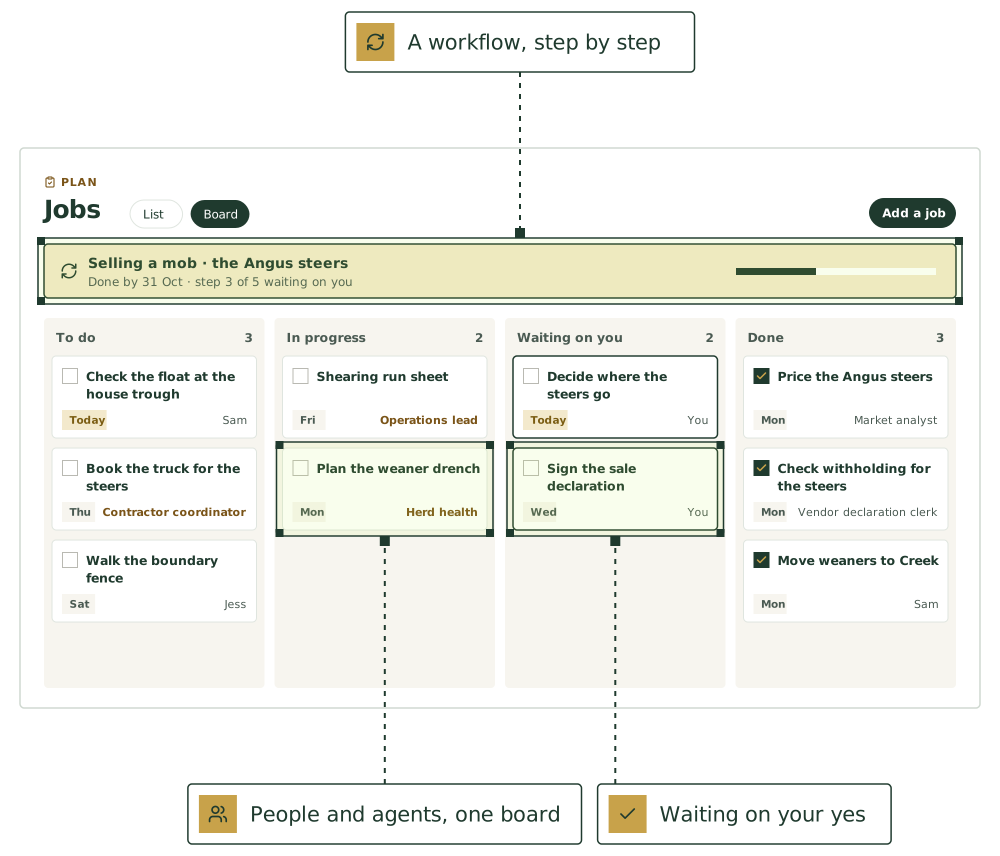
Give a job a due date, a person and a paddock, and tick it off in one tap. The agents add their jobs to the same list.
- People and agents on one list
- 6 ready-made workflows
Workflows
Six ready to start, or build your own.
Start one with what it’s for and a done-by date. Its steps go on the job list: agents start theirs when their turn comes, and people find theirs on their own list.
Selling a mob
From pricing the mob to the truck leaving, with the paperwork checked before anyone commits.
- 1Price the mob
 Market analyst
- 2Check withholding and get the sale declaration ready
 Vendor declaration clerk
- 3Decide where they goYou
- 4Book the truck
 Contractor coordinator
- 5Record the movement
 Stockperson
Taking on a new worker
Advertise, choose, and get them set up and inducted properly.
- 1Write the job ad and position description
 Recruiter
- 2Interview and chooseYou
- 3Draft the contract and check the award
 Employment officer
- 4Set up pay
 Payroll clerk, at the same time
- 5Plan the induction
 Induction recorder
Buying in stock
Find and price stock, decide, then bring them in safely and get the records right.
- 1Find and price stock
 Livestock buyer
- 2Decide what to buyYou
- 3Plan the arrival treatments
 Herd health and biosecurity
- 4Record the arrival and movement formStockperson
Getting ready for an audit
Check the records an auditor will ask for, and fix the gaps before they come.
- 1List what the audit will check
 Compliance officer
- 2Check the treatment records
 Animal medicines register
- 3Check the chemical records
 Chemical register, at the same time
- 4Fix the gapsYou
Weaning
Plan the date, the health work and the feed, then record the new mobs.
- 1Plan the weaning date and mobsStockperson
- 2Plan the vaccinations and drenchesHerd health and biosecurity
- 3Plan feed for the weaners
 Feed and fodder planner, at the same time
- 4WeanYou
- 5Record the new mobsStockperson
Getting ready for fire season
Firebreaks, the fire unit and the insurance, before the first hot day.
- 1Check firebreaks and the fire unit
 Fire season planner
- 2Service the fire unit and pumps
 Machinery keeper
- 3Check the insurance cover
 Insurance officer, at the same time
- 4Do the jobs on the listYou
Built for a day that changes with the weather.
Tick it off in one tap
Tick boxes on the job list, on Home and on the calendar finish a job, with Undo.
A list or a board
To do, In progress, Waiting on you, Stuck and Done. Drag a card, or use Move on a phone.
Checks and sign-off
Have someone check a job, and someone sign it off, before it counts as done.
Workflows you use again
Selling a mob, taking on a worker, buying in stock, an audit, weaning and fire season, ready to start. Each step is for a person or an agent.
The calendar and the farm year
Day, week and month views with the weather, and a farm year built from your setup, with tax dates for Australian farms.
Goals
Set a goal like “Audit ready by March”, link jobs to it, and see how many are done.
The agents that keep it.
Each keeps its part current, asks before anything that matters, and hands work to the others.

Operations lead
Jobs, rosters, the Monday plan
Contractor coordinator
Shearers, sprayers, carriers, vets: bookings and confirmations

Scribe
Turns voice notes, texts and photos into structured records

Rosterer
Rosters, leave and hours under the Pastoral or Horticulture Award
Good first jobs
Jobs the team does with it.
Turn a staff text into a job
When: Staff member texts “fence down on the north boundary”
You get: Job plus a mob-at-risk warning
Send the weekly plan on Monday
When: Monday morning
You get: Weekly plan sent to you by text or email
Turn the shed whiteboard into jobs
When: Photo of the shed whiteboard
You get: New jobs to add and done ones to tick off, for your okay
Chase the jobs that are overdue
When: Wednesday morning each week
You get: Overdue list by person; texts drafted for you to send; nothing marked done without a reply
Book and chase contractors
When: “Get the spreader in before the rain”
You get: Booking emailed after your yes; on the plan once they confirm; a nudge if nothing comes back
Hand the farm to a relief manager
When: “I’m away from the 10th for a week”
You get: Handover pack; the relief manager can text your main agent with questions
Use ours, or keep yours
Already use other software for this? Keep it.
Until your own calendar is connected, dates are sent to you as calendar invites by email.
Google and Outlook calendars
Once it’s connected, scanning, shearing, contractor and audit dates will appear on the calendar you already use.
Put [AGENT NAME] to work on your farm.
We’re taking a small number of pilot farms in [REGION]. Start with one or two agents and add more as you go.
See it on a farm like yours.
30 minutes with Thomas, our founder, on records like your own.
Livestock, paddocks, visitors and tanks, in one place.
The farm management software comes with every plan. Keep the software you already use, or use ours.
Not ready yet? Start with a free calculator.
The sums you do every week, for stock, pasture, crops and the books. No sign-up.
Watch a job before you commit.
Pick a playbook and see it play out, step by step.