Visitor sign-in
Visitors sign in at the gate from a QR code.
Visitors scan the code with their phone and answer your biosecurity questions on a web page. No app and no account. You get a register nobody can change after the fact.
- On every plan
- No app for visitors
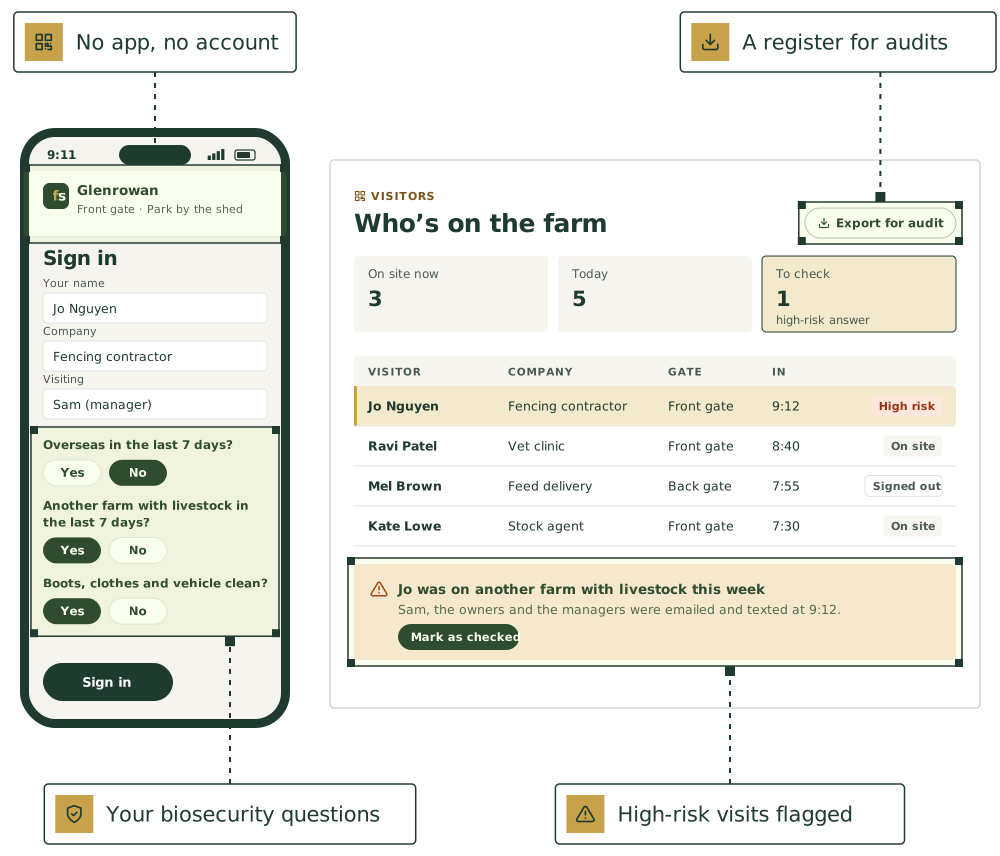
From the gate to the register.
- Step 1
Print a sign for each gate
A big QR code, the farm and gate name, and the web address to type in. Dark on white, ready to laminate.
- Step 2
Visitors scan and answer
Their details, who they’re visiting, your biosecurity questions and your site rules, on their own phone.
- Step 3
High-risk visits flagged
The person they’re visiting and the owners and managers get an email and a text. The visitor is asked to wait for a word.
- Step 4
The register, ready
Every answer as the visitor saw the question, with their induction and signature. Export it for an audit.
The questions it starts with
- The reason for the visit
- Been overseas in the last 7 days?
- Been on another farm with livestock in the last 7 days?
- Boots, clothes and vehicle clean?
- Bringing animals, plants, soil or used gear onto the farm?
Change the wording, switch any off, or add your own: yes or no, pick from a list, or a typed answer.
On every plan
Visitor sign-in comes with every plan, with nothing extra per gate or per visitor. Turn it off and the gates close, but the register is kept.
The rest of people and safety
WHS incidents, near misses and worker inductions are records too, kept by the WHS officer.
Quick for visitors, and a record that holds up.
A QR code at every gate
Up to 20 gates, each with its own code and a note visitors see first, like “Park by the shed”. Print a sign ready to laminate.
Your biosecurity questions
Five to start, then change the wording, switch any off, or add your own. Up to 20 questions.
High-risk visits flagged
Mark which answers are high risk. The person being visited, the owners and the managers get an email and a text straight away.
Inductions, signed
Site rules, a document such as your biosecurity plan, up to 12 statements ticked one by one, and a signature with a finger.
A tablet at the shed
For visitors without a phone: big Sign in and Sign out buttons, and it starts again after each visitor.
A register for audits
Who’s on site now, today and this month. Nobody can change what a visitor said, and owners can export it to a spreadsheet.
The agents that keep it.
Each keeps its part current, asks before anything that matters, and hands work to the others.

Herd health and biosecurity
Mortality patterns, vet protocols, farm biosecurity plan, visitor log

WHS officer
Inductions, incident log, contractor insurance, hazard register
Disease watch
Notifiable disease signs, state alerts, and when to call the Emergency Animal Disease Hotline

Compliance officer
NLIS, eNVD, LPA audit readiness
Good first jobs
Jobs the team does with it.
Log visitors at the gate
When: A visitor scans the code on the gate sign
You get: Visitor and vehicle log; you’re told who’s on the property
Keep the farm biosecurity plan current
When: Annual review, or something changes on the farm
You get: Marked-up plan, updated after your yes
Get the farm’s entry rules to contractors before they arrive
When: The day before shearers, scanners or a fencing crew are booked on the place
You get: Entry rules drafted as a text to the crew boss for you to send; visitor log entry waiting; a note if they were on another property in the last [days]
Check an overseas visitor before they walk the yards
When: A visitor booked on the farm says in the visitor log they’ve been overseas in the last week
You get: Visitor flag before arrival; rules from your biosecurity plan sent to them; visit logged with country and dates
Induct a new casual by text
When: “[Name] starts Monday”
You get: Induction ready to send; the sign-off on file once they reply
Check recent stock purchases when an outbreak alert lands
When: A state biosecurity alert names a disease detection in a district the farm has bought stock from recently
You get: Alert summary in plain words; list of bought-in mobs from the area and where they are; visitor log for the period; who to call
Put [AGENT NAME] to work on your farm.
We’re taking a small number of pilot farms in [REGION]. Start with one or two agents and add more as you go.
See it on a farm like yours.
30 minutes with Thomas, our founder, on records like your own.
Livestock, paddocks, visitors and tanks, in one place.
The farm management software comes with every plan. Keep the software you already use, or use ours.
Not ready yet? Start with a free calculator.
The sums you do every week, for stock, pasture, crops and the books. No sign-up.
Watch a job before you commit.
Pick a playbook and see it play out, step by step.