Tell it what’s happening. It does the paperwork and checks with you first.
You can text it, or it picks things up from the weather, the dates and your records.
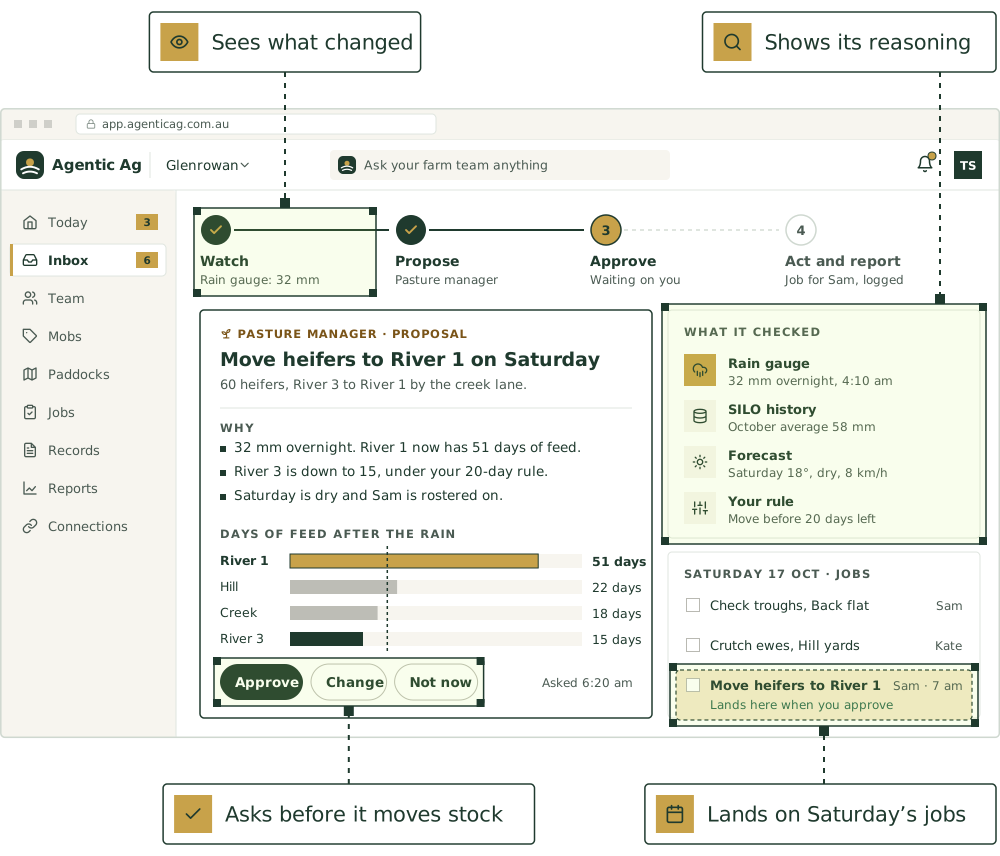
The five steps
- Step 1
Connect
Your phone, email, records and the systems you already use.
- Step 2
Watch
Weather, sensors, prices, dates and every message you send.
- Step 3
Propose
A specialist works out what to do, and shows why.
- Step 4
Approve
You say yes, not now, or change it. Routine jobs can go ahead on their own.
- Step 5
Act and report
The work gets done and logged, and one message tells you what happened.
Then it goes back to watching. Every step is logged.
Approval levels
Choose how much each agent does on its own.
What you’d hear at “Inform”
“Rain gauge says 32 mm overnight. That should lift the feed budget, and nothing needs doing yet.”
What you’d hear at “Recommend”
“Thursday’s too windy for the spray. Saturday morning looks better: 8 km/h and 18°C. Want me to move it?”
What you’d hear at “Act with approval”
“The sale declaration for Thursday’s steers is filled in. WHP is clear. Approve and I’ll send it to your stock agent.”
What you’d hear at “Act and tell”
“Logged the drench on the weaners and set a reminder for the day before the WHP ends.”
Whatever the level, nothing is lodged with a government or industry system without your approval.
Three example days, step by step.
Names and numbers are made up. The jobs are real playbooks.
A sale, end to end
Tuesday
You text: “Sold the 12 Angus steers through [agent] at [saleyard] Thursday.”
Tuesday
The Chemical register checks the last drench: WHP and ESI clear by Thursday.
Tuesday
The Compliance officer fills in the sale declaration and the movement form to [saleyard].
Tuesday
You check the forms, tap approve and lodge them.
Friday
Your stock agent emails the account sale. The Inbox clerk reads it, and the Processor data analyst matches price and weight to the mob.
A dry spell
Day 1
The Weather watcher sees 4 mm for the month and a dry outlook.
Day 1
The Pasture manager runs the feed budget forward: about [X] weeks at current stocking.
Day 1
The Feed and fodder planner checks hay on hand: it runs out [date] at the current rate.
Day 1
One text with three options: sell the 40 lightest weaners, agist the cows, or start feeding hay. Rough costs on each.
Day 2
You pick one. The jobs, the bookings and the sale list follow.
A staff report
7:42am
A staff member texts a photo: “Fence down north boundary near the dam.”
7:42am
The Scribe logs it with the photo’s location.
7:43am
The Operations lead creates the job and assigns it to whoever’s closest.
7:43am
The Pasture manager sees the ewes in North 2 can reach the gap, so it’s flagged urgent and you’re told.
10:15am
“Fixed.” The job’s closed, with who did it and when.
About two weeks from first text to a working team.
- Day 1
1. Connect your phone and email
Save the number, set up your farm’s forwarding address. Send your first voice note.
- Week 1
2. Bring in mobs and paddocks
From your old software’s export, a spreadsheet, a map file, or a walk-through call.
- Week 1
3. First weekly summary
Monday morning: what happened, what’s due, what’s waiting on you.
- Week 2
4. Set the approval levels
Decide which jobs each agent can do on its own, and which it brings to you.
Farm management software
Where the work ends up.
Whatever you text, the team files it in the farm software that comes with every plan.
Livestock management
Mobs and single animals, for cattle, sheep and every other species.
Paddock management
Paddocks on a satellite map, with every mob in its paddock and its rest days.
Visitor management
A QR code at the gate, your biosecurity questions and a register for audits.
Tank and trough monitoring
Tanks, troughs, dams and fences, with alarms and days of water left.
Asset tracking
GPS trackers on utes, trailers and gear, and every machine’s service history.
Pregnancy scanning
Scan results on the mob or on each animal: empty, pregnant, twins or triplets.
Breeding and genetics
Joining, dam and sire, and registration numbers, so you can follow a line back.
Sale records
Every sale with its price, buyer and movement document, and the head count kept right.
Weather and rainfall
Rainfall by gauge or paddock, with your district’s weather history behind it.
Integrations
Keep the farm software you already use. See where each connection is up to.
Start with one or two agents.
Join the pilot, choose what each agent can do on its own, and add more as you go.