Documents
Farm documents the team can read and write.
Keep the farm plan, the vet’s protocol and the soil tests in one place. The team reads what you let it, says which page it used, and saves what it writes.
- PDF, Word, Excel, photos
- Every version kept
One place for the paperwork.
Add it any way
Take a photo, choose a file or drag one in: PDF, Word, Excel, PowerPoint, text, CSV and photos, up to 8 MB.
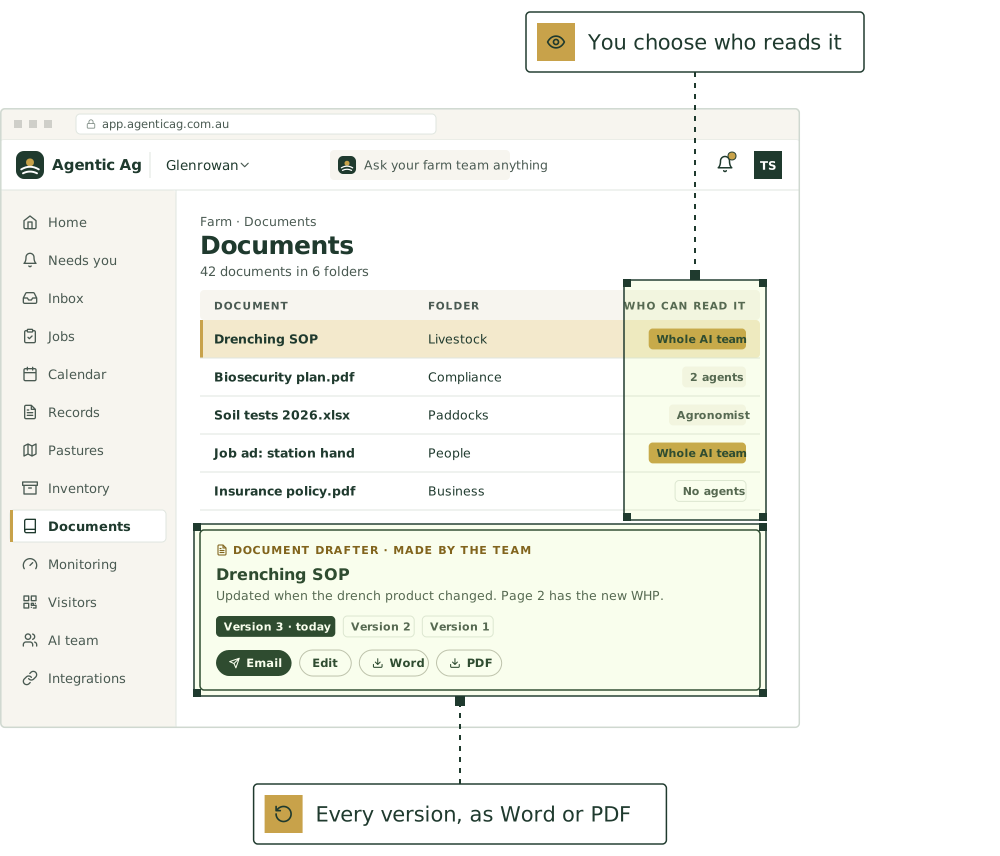
You choose who reads it
The whole AI team, chosen agents or no agents, for each document or folder.
It says where it looked
When an agent uses a document, it names the page or row, so you can check it.
Every version kept
Job ads, plans, letters and checklists the team writes are saved with every version. Edit in place, or download as Word or PDF.
Email it from there
Send a document to people on the farm or a contact. When an agent sends one off the farm, it asks first.
A reference library
Assurance rules, WHP tables and movement rules, kept up for every farm.
The agents that keep it.
Each keeps its part current, asks before anything that matters, and hands work to the others.

Document drafter
Writes farm documents from your records

Inbox clerk
Reads forwarded email and PDFs: invoices, account sales, kill sheets, lab results

Scribe
Turns voice notes, texts and photos into structured records

Compliance officer
NLIS, eNVD, LPA audit readiness
Good first jobs
Jobs the team does with it.
Write a staff SOP or a job ad
When: “Write up how we do the lamb marking for the new bloke”
You get: SOP or job ad for you to edit and send
Write the one-page emergency sheet for the shed wall
When: “Can you do us an emergency sheet for the shed and the house? Address, who to ring, that sort of thing.”
You get: One-page emergency sheet as a PDF; gaps marked for you to fill; a copy for the contractor induction pack
Update the drenching SOP when the product changes
When: A drench is logged with a product that isn’t the one named in the drenching SOP
You get: Revised SOP with the changes marked; WHP and dose lines filled from what you give it; old version kept with a note on why it changed
Get the old paddock notebook into the records
When: Photos of a few seasons of handwritten notebook pages
You get: Back-dated records, each marked as transcribed from the notebook, ready for your okay
Assemble an insurance claim pack
When: Hail, fire or flood damage reported
You get: Claim pack for your broker
A pack for the family succession meeting
When: “We’re sitting down with [advisor] about the farm next month”
You get: A plain pack for the meeting, with no legal or tax advice. The advisor and the family make the decisions.
Use ours, or keep yours
Already use other software for this? Keep it.
Send in files any way you like today. Shared spreadsheets are being looked at.
Photos, PDFs and spreadsheets
Send in scale exports, scan results, soil tests, old spreadsheets or a photo of the shed whiteboard, and they become records.
Inbound email
Forward invoices, kill sheets, NVDs, soil tests and emails from your stock agent to your own farm address. The team reads each one, sums it up and suggests who handles it.
Google Sheets
If we get access, you’d keep using the spreadsheet you already run on, and the team would read it and keep it up to date.
Put [AGENT NAME] to work on your farm.
We’re taking a small number of pilot farms in [REGION]. Start with one or two agents and add more as you go.
See it on a farm like yours.
30 minutes with Thomas, our founder, on records like your own.
Livestock, paddocks, visitors and tanks, in one place.
The farm management software comes with every plan. Keep the software you already use, or use ours.
Not ready yet? Start with a free calculator.
The sums you do every week, for stock, pasture, crops and the books. No sign-up.
Watch a job before you commit.
Pick a playbook and see it play out, step by step.