Staff and safety
The people on the farm, and the safety records behind them.
Invite everyone you work with, each in a role that fits. Incidents, near misses and inductions go on the record from your phone.
- Contractor and view-only access
- Incidents from a text
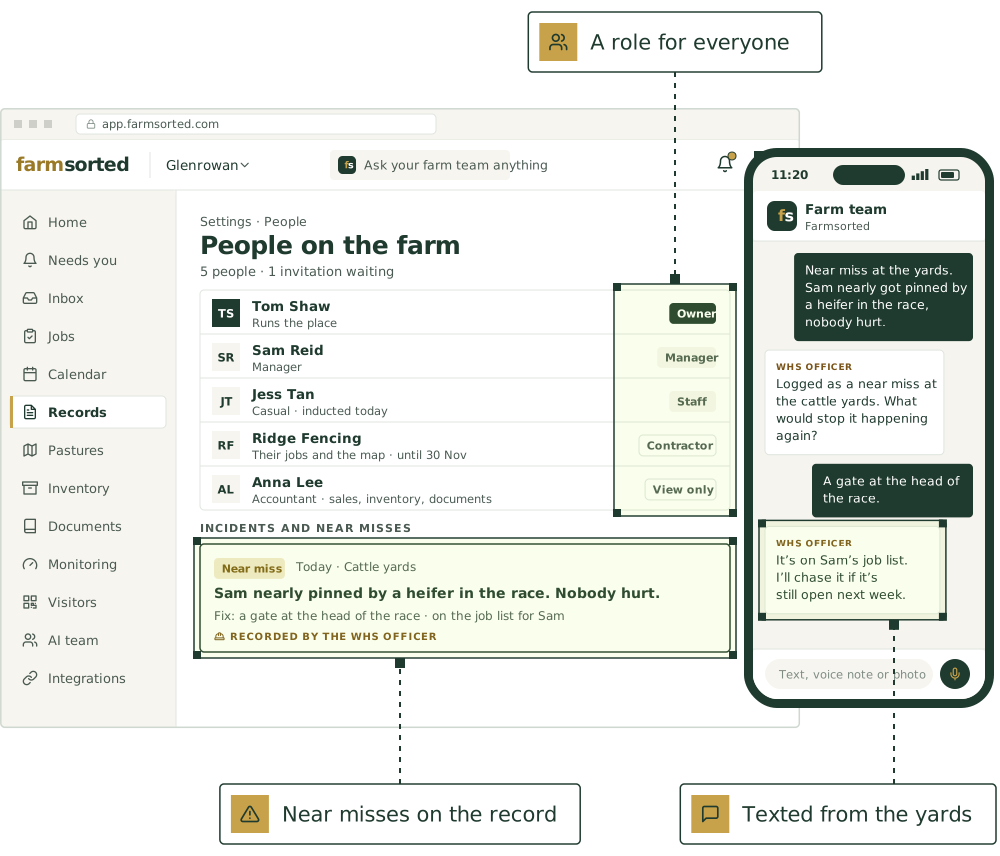
What you can record for staff and safety.
Roles
Who can do what.
Invite as many people as you like, and change someone’s role or remove them at any time.
Owner
Whoever runs the place.
Everything, including billing, changing roles and removing people.
Manager
Whoever runs it day to day.
Sets up the farm, changes agents, says yes or no when an agent asks, and invites people. Can’t see billing.
Staff
People who work on the farm.
Chat with the AI team, add records and do jobs. Can’t say yes when an agent asks.
Contractor
The fencer, the sprayer or the shearing team.
Sees only the jobs you give them and the map. Ticks their jobs off and adds updates. No prices, and no chat with the AI team.
View only
Your accountant, stock agent, auditor or farm advisor.
Looks at the parts of the farm you tick and changes nothing. Prices only if you switch them on, and access can end on a date.
- Accountant: sales, purchases, inventory and documents, with prices
- Stock agent: livestock, sales and the map, with prices
- Auditor: records, visitors, inductions and incidents, for 30 days
- Farm advisor: livestock, the map, spraying, feed and monitoring
The right access, and the paperwork done.
Everyone in the right role
Owner, manager, staff, contractor or view only. A contractor sees only their jobs and the map; your accountant sees only the parts you tick.
Invite as many as you like
Each invitation says who sent it, for which farm and in what role. A fresh link is one tap.
Incidents and near misses
Report one from your phone in a few taps, or tell the WHS officer, who records it and chases the fix.
Inductions on file
Workers and contractors inducted, with the date and what was covered.
Tickets and licences
File a ticket from a photo. The tickets and training keeper reminds you before it runs out.
Rosters and hours
The rosterer fits leave into the roster and flags hours creeping towards overtime.
The agents that keep it.
Each keeps its part current, asks before anything that matters, and hands work to the others.

WHS officer
Inductions, incident log, contractor insurance, hazard register

Tickets and training keeper
Chemical accreditation, licences and inductions, with expiry reminders

Rosterer
Rosters, leave and hours under the Pastoral or Horticulture Award

Employment officer
Employment contracts, award classifications, staff housing, visa sponsorship and performance notes

Operations lead
Jobs, rosters, the Monday plan
Good first jobs
Jobs the team does with it.
Report a near miss or incident
When: “Nearly rolled the quad on the creek bank”
You get: Incident report; a suggested fix for the hazard
Induct a new casual by text
When: “[Name] starts Monday”
You get: Induction ready to send; the sign-off on file once they reply
Keep tickets and licences current
When: A ChemCert, first aid or machinery ticket nears expiry
You get: Reminder to you, with who it’s for and the next course dates
Check in on someone working alone
When: “Heading out to the back block, back by 3”
You get: A check-in log, and someone told if a check-in is missed
Walk the hazard register once a year
When: The anniversary of the last hazard register review
You get: A walk-round checklist; new hazards to add; updated register once you’ve been round

Chase the fix from a near miss that nobody closed
When: A fix agreed after a near miss or incident is still open 14 days later
You get: The incident and its open fix; what has happened since; a job with a date; the record closed once it’s done
Put [AGENT NAME] to work on your farm.
We’re taking a small number of pilot farms in [REGION]. Start with one or two agents and add more as you go.
See it on a farm like yours.
30 minutes with Thomas, our founder, on records like your own.
Livestock, paddocks, visitors and tanks, in one place.
The farm management software comes with every plan. Keep the software you already use, or use ours.
Not ready yet? Start with a free calculator.
The sums you do every week, for stock, pasture, crops and the books. No sign-up.
Watch a job before you commit.
Pick a playbook and see it play out, step by step.