Onboarding and data migration
We’ll bring your farm records across.
From other software, a spreadsheet or the stock book.
- [No charge on any plan]
- A plan for the first 90 days
- Your old software keeps running
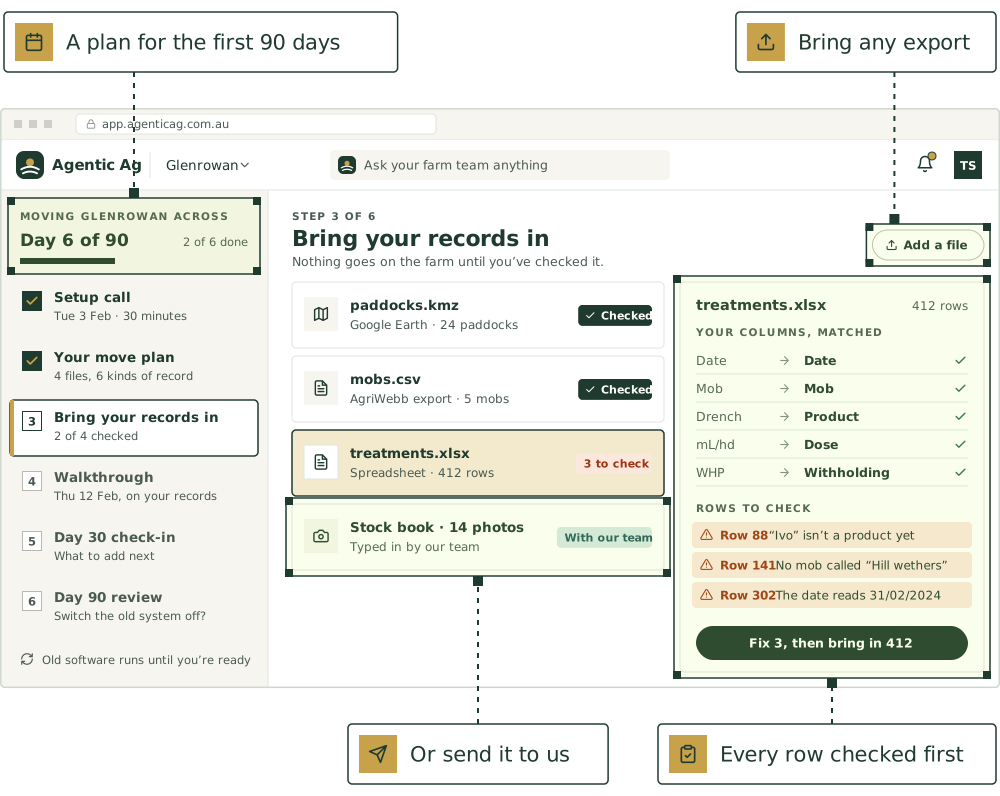
Moving your records
Three ways in. Use one, or mix them.
Bring it in yourself
ComingStart from our template for each kind of record, or the file your old software exports. Match your columns once, check every row, then bring it in.
Today: Paddock shapes from a map file, and lists of paddocks, mobs and animals pasted from a spreadsheet.
Send it to us
Coming[Send the export, the spreadsheet or photos of the stock book. Someone on our team brings it in, and you check it before it goes on the farm.]
Today: Send it in and we’ll work through it with you on a call.
Connect your software
ComingWhere your farm software lets us, the team reads from it directly, so there’s nothing to export and both stay in step.
Today: Being built, starting with AgriWebb. Until then, use its export.
What comes across
Each row is matched on the field under Matched on, so nothing already on the farm is added twice. Coming means it’s being built and isn’t in the app yet.
Livestock
- MobsPasted from a spreadsheet with the head count, up to 100 at a timeMatched on: Mob nameLive
- Animals one by oneTags and electronic IDs pasted as a column, up to 500 at a timeMatched on: Electronic ID, then visual tagLive
- Stock bought inThe list from the vendor, the saleyard or your scale reader, with weights, sex and breed, up to 2,000 at a timeMatched on: Electronic ID, then visual tagLive
- Kill sheetsThe processor’s CSV, on the sale or killMatched on: Electronic ID, then visual tagLive
- Treatments, joining, scanning, weighing, health checks and feedingA template for each, or your old software’s export, with the dates kept so withholding periods and weight gain carry onMatched on: Date, and the mob or animalComing
- Births, deaths, sales, purchases and mob movesA template for each, or your old software’s export, so each mob’s head count and grazing history add upMatched on: Date, and the mob or animalComing
Paddocks and crops
- PaddocksPasted from a spreadsheet with the area, up to 100 at a timeMatched on: Paddock name, or another name it goes byLive
- Paddock shapesKML, KMZ or GeoJSON from Google Earth, mapping software or your agronomist, up to 200 at a timeMatched on: Paddock name, or another name it goes byLive
- Chemicals and fertiliserA template, or your spray diary as it isMatched on: Date, paddock and productComing
- RainfallA template, or your rain gauge spreadsheetMatched on: Date, and the paddock or gaugeComing
Machinery
- Services and repairsA template, or your service logMatched on: Date and machineComing
People and safety
- WHS incidents and inductionsA template, or your WHS registerMatched on: Date, and who it wasComing
Inventory
- Stock on handA template, or your shed list, with batches and expiry datesMatched on: Item name, then batch numberComing
The farm office
- ContactsA template, or your contact list as it isMatched on: Phone number, then emailComing
- DocumentsPDFs, Word, Excel and photos, uploaded to Documents for the team to readMatched on: Each file is kept as it isLive
Any record can also keep the ID it had in your old software. Once the templates are in, a newer file is matched on that first, so it updates records instead of doubling them.
Your first 90 days
Mapped out before you start.
- Before day 1
1. Setup call
We do
- [A call with a person: what you farm, who works on it, and what you keep records in now]
- A move plan by email: which records come across, from where, and in what order
You do
- Send the files on the plan
- Do the farm setup in the app, about 15 to 20 minutes
- Week 1
2. Your records come across
We do
- Match your columns and bring the records in, or help you do it
- Check the totals with you: head counts by mob and paddock, so nothing goes missing on the way
You do
- Check each file before it goes on the farm
- Save the number to text the team, and forward a first email
- Week 2
3. Walkthrough
We do
- [A screen share on your own records, not a demo farm]
- Set approval levels with you, and pick the first one or two agents
You do
- Invite the people you work with
- Work through the first-day checklist on Home
- Day 30
4. Check-in
We do
- [A call on what’s working, what’s missing and what the team got wrong]
- Bring across anything left over
You do
- Add the next agents
- Let the jobs that have gone well do more on their own
- Day 90
5. Review
We do
- [Go through three months of the team’s work with you, from the Activity log]
- Help you decide whether to switch the old software off
You do
- Tell us what to fix
- Keep both, or make this the farm’s one system
While you move
What you can count on.
- [A person on your side from the first call to the day 90 review, not a help article.]
- [No setup fee and no charge to move your records, on every plan.]
- Your spreadsheet as it is. Your column names and paddock names are matched, so nothing gets retyped.
- Your history, not just today’s head count. Treatments, weights and scanning come with their dates (with the templates, coming).
- Nothing goes on the farm until you’ve checked it.
- Your old software keeps running for as long as you want it.
- [And if you ever leave, your records come with you in standard formats.]
Moving from other farm software?
Its export works today. Here’s where each direct connection is up to.
AgriWebb
Once it’s connected, the team reads your mobs, animals and paddocks from AgriWebb, so you don’t key anything in twice.
Mobble
The team would read your mobs, paddocks and treatments from Mobble, so nothing is keyed in twice.
MaiaGrazing
Grazing plans and stock and pasture records from MaiaGrazing would sit alongside everything else.
Google Sheets
If we get access, you’d keep using the spreadsheet you already run on, and the team would read it and keep it up to date.
Onboarding questions
Still have a question?
Ask a real person, or see the product in a 30-minute demo.
What does onboarding cost?
How long does it take to move across?
Which software can I move from?
Do I have to stop using my old software?
Our records are on paper and the whiteboard. Does that work?
We run mobs. Can we tag animals one by one later?
What happens to tags and electronic IDs?
Start with your own records.
Join the pilot, and the first call is where we plan the move with you.